Watch
A main, called end to end.
Demo mode, running the real race logic and the whole show — the opening, the introductions, the calls, the flag and what comes after it. This is what a club hears.
Sound on — the announcer is the point. Watch on YouTube
The difference
Timing software announces. HeatCaller produces.
An announcement is a line of text read aloud when something happens. A show is a structure: it opens, it has segments and people in it, it goes to a break, it comes back, and it signs off. HeatCaller is the only RC timing app that builds the second thing.
Reads the position out when a car crosses. Maybe a fastest-lap chime. The same twelve phrases every Saturday, in the same order, in a voice the room stopped hearing in April. Between races, silence.
Opens the evening. Introduces the grid by number, home club and form. Throws to a co-host with a point of view. Calls the lead change and says it's the fourth. Takes a commercial break your sponsors paid for. Comes back, recaps, hands out the achievements, interviews the winning team's technical lead, and signs off into the next race.
Run of show
One race, from the jingle to the sign-off.
Every segment below is written from what actually happened on your track — the real grid, the real laps, the real season. Each one stays quiet when the race gives it nothing to say, so a club hears a show rather than padding.
Your club's own opener lands, the music bed comes up underneath, and the first words arrive over its tail — a broadcast coming on air, not a clip followed by an announcement.
Down the grid in order: grid slot, racing number, home club, and the most interesting true thing in their record — a first start, a hundredth, a winning run, won last time out. Before a main it opens with what qualifying decided and by how much.
The host hands to the co-host, who has the Team Principal from a driver's team before the off.
Then green. The start waits for the show, not the other way round.
"That's the fourth lead change, among three drivers" — the line only a booth watching the whole race could give.
Calls a fight once two cars have been locked together a while, and says what it's for — the lead, or third.
A record falling — the race's, the night's, the layout's — and what the lap actually beat.
A short line so the room knows a recap is coming.
Your sponsor slides take the big screen while the recap is being written — so the half-minute the writing takes is advert time instead of silence. A video leads the break where the club has one.
Coming back from the break, the race told as a story: who led and for how long, what the lap times meant, how close it was at the end.
A third voice reads out the badges the race unlocked — first win, hundredth race, hat trick.
The form guide and the grid history, inside the recap's own show rather than as separate broadcasts after it.
Two questions for the winning team: one about the race, one about the car. What it says about the car comes from the setup actually logged in the garage that day, and what changed from the run before.
Always the last thing, naming the show and the next race on the program.
The night's totals, the fastest lap, the closest finish.
The whole evening written for the people who weren't there — played out in the hall as everyone packs up, and left in tonight's folder as a file you can post.
The big ones
Six things no other RC timing system does.
Every driver leaves with a video
After each race HeatCaller cuts an upright, captioned video for every driver out of the race recording — a title card, their race drawn in your club's Look with positions, passes and battle banners, the announcer calling them over the top, and an end card with the result.
Nobody else in RC timing makes one at all.Their race call, cut just for them
After every race HeatCaller cuts each driver an mp3 of only the moments the announcer called them — their fastest lap, the pass for the lead, the podium call — and can put it on their own private night page, opened by their badge. The videos stay on the laptop, ready to share.
Their own page only, never a public one.Talk to one driver only
Pick a driver and coach them while they practise: every lap against a target, how tight their last five were, up or down at the split, the gap to their own ghost. Words, or quiet tones the instant they cross. A coach page on their phone reads their laps out in its own voice.
A co-host who disagrees
The host and the co-host are written as one exchange and split in two, so the answer actually answers. Seven dispositions: backs the underdog, takes nothing on one lap, remembers everything, explains why.
Nobody is ever unkind about a driver. The edge is about the racing.Segments your club can sell
"The fastest lap, presented by Joe's Hobby Shop — everything you need to go faster." Sponsors attach to moments, their tagline is read with the credit, and a report shows exactly what each one got.
The commercial break is real airtime, not a logo in a corner.The whole night, in their pocket
What race they're in and roughly when, an alert when they're called, check-in and a transponder test. Afterwards: every race with a lap chart, the announcer's call of it, their improvement, badges within reach — and a way to ask the desk for a change without queuing.
The app
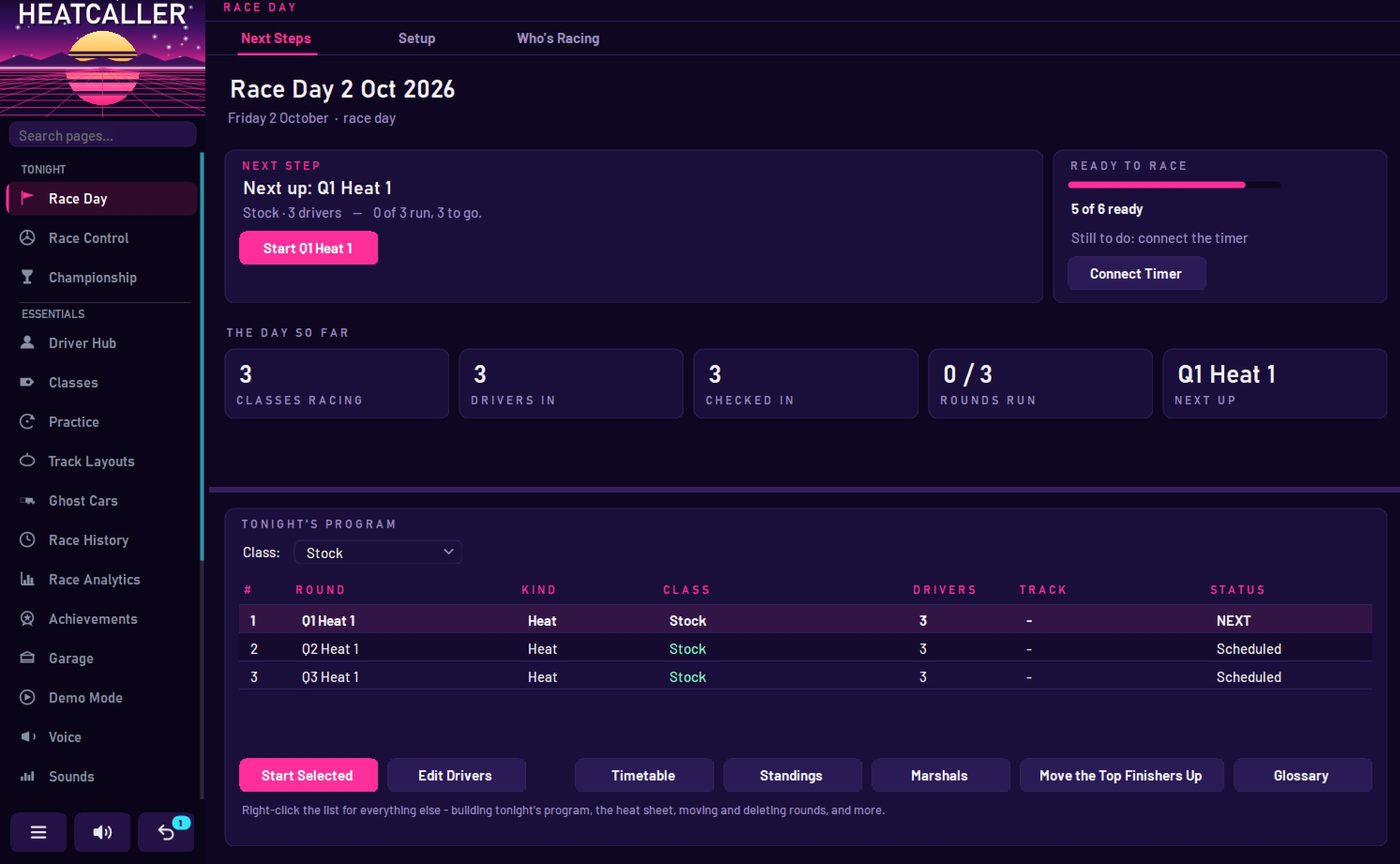
One laptop runs the night.
Race day opens on what happens next — the round, who's in it, what's left to run, and one button that starts it. A readiness check names anything still to do.
Everything in it
202 features. Sixty-four of them are the show.
HeatCaller replaces your timing system rather than sitting alongside it, so the list below has to cover a whole race night — the decoder, the program, the season, the screens and the website. The broadcast is the half nobody else has.
202
Features in beta 0.60
Counted from the manual, grouped below. The broadcast groups are marked.
Read all 202
The broadcast — the produced show — 40
- AI race commentary written per race from the night's real facts
- Driver introductions in grid order — number, home club, form line
- Qualifying report before the mains
- Pre-race throw to pit lane
- Team Principal interview before the race
- On Air start sequence — jingle, opening, bumper, then staging
- Live lap, position and lead-change calls
- Lead-change count, NASCAR style — "the fourth lead change, among three drivers"
- Battle watch, naming what the battle is for
- Record-lap calls against race, night and layout records
- Pace notes
- Halfway standings
- Finish call
- Teaser line into the recap
- Commercial break — sponsor slides while the recap is written
- Race recap
- Achievements read by a third voice
- Color segments inside the recap — form guide, grid history
- Technical Lead interview after a main
- TV-style sign-off, teeing up what's next
- Championship check after a class's last main
- Milestones — hundredth race, first podium, club record
- Form guide from recent results
- Grid history — debuts and rivalries
- Sign-off numbers — the night's totals
- This day at the club
- Co-host — two voices in the booth, written as one exchange
- Seven co-host dispositions, including Explains why
- Named cast — show, announcer, co-host, technical lead, achievements reader
- Show music — opener, bed and sting, 7 beds and 7 openers included
- Hitting the post — voice lands on the tail of the opener
- Writing tone — enthusiastic, neutral or dry
- Chattiness dial
- Pacing dial — how much room between calls
- Commentator number reading — "a five-oh-six", "nothing in it"
- Rivalry lines
- Continuity — the announcer comes back to what it said earlier
- Pronouns per driver, used everywhere the commentary writes
- Technical Lead interview after heats too, not only mains
- Every line the announcer didn't say, and why
The room in the show — 6
- Club notes — things the timing can't know, read on air
- Notes sent in from the room over Wi-Fi and the club page
- The room's vote on who wins, with the announcer's verdict
- Shout-outs from the room
- Championship stakes said out loud, with the condition
- Why did it say that — the reasoning behind the last segment
Voices — 6
- HeatCaller voice — included, no account needed
- ElevenLabs on your own account
- Kokoro — free, offline
- Six soundscapes, each a whole sound for the night
- Recorded voice lines per soundscape
- Name pronunciation check before the night
Recording, video and sharing — 12
- Every race recorded as an mp3, exactly as the room heard it
- A highlight clip per driver, cut around their own moments
- The sign-off recorded as its own file
- The Night — the whole evening written and played as a four-minute piece
- A piece about one driver's night, for that driver
- A private page per driver, opened by their own badge
- A highlight video for every driver, captioned, in your Look
- Title card, the race drawn as it ran, and an end card with the result
- Every video kept on the laptop, in the night's Highlights folder
- The music and crowd under the call, as the room heard it
- A driver's own race call on their private night page
- Share video from the driver's drawer on Race Control
The stream and the big screen — 18
- Big Screen leaderboard for a TV
- Choosable leaderboard columns
- ON AIR band while the show is on
- Banner for warnings, fastest sectors, lead changes and milestones
- Grid roll call
- Between-races cards
- Track evolution
- If it ended now — live championship
- Live track map
- Stopped-car locator
- Best-lap ghost on the track map
- OBS transparent overlay
- Broadcast graphics page for streaming
- Timing tower pylon — interval, gap to leader, laps led
- Battle box that remembers the fight
- Webcam photo finish
- Announcer screen
- Qualifying projection
Sponsors — 8
- Sponsor slides rotating on the Big Screen
- Sponsor videos
- Sponsor reads, written and spoken
- Sponsored segments — "the fastest lap, presented by"
- A sponsor's picture on screen during their read
- Sponsor report — exactly what each sponsor got
- A sponsor's tagline read with every credit
- Sponsor reads between races, opt-in
Timing and race control — 25
- Direct EasyLap decoder over USB
- I-Lap decoder over serial
- Decoder connects by itself
- Flag control on F1–F6
- Lap-limited and timed races
- Minimum lap time
- Own release and shared green starts
- Staggered and pursuit starts
- Qualifying starts
- Jump-start detection
- Race Mode full screen
- Mission Control
- Timing warnings when laps may not be counting
- Split loops
- Split and sector times
- Sector records and best sectors
- Speed trap
- Quick Race
- Pre-race check
- Undo, 25 steps deep
- Split times read at the loop
- Battle gap at the split
- Quickest through each sector, at the flag
- A corrections drawer under the driver you click
- Lap breakdown on a double-click
Race day — 16
- Race days with entries
- Check-in, including QR scanning
- Scrutineering log
- The whole qualifying program built in one press
- A next-step card that always says what to do
- A, B and C mains with bump-ups
- Heats seeded by pace
- Corner marshal assignment
- Timetable
- Heat sheets to print
- Qualifying methods per class
- Class rules and tech checklists
- Rentals, with a count while any are out
- Handicaps for a mixed-ability grid
- Venues — a track's whole setup in one click
- Track Layouts with the Track Designer and RCP sets
Drivers and cars — 8
- Driver Hub — names, photos, records
- A driver in more than one class
- Any number of transponders per driver
- Transponder transfer between drivers
- Transponder health over time
- CSV import
- Garage — cars, setups and which changes were quicker
- Battery pack tracking per driver
Results and the season — 12
- Race History, saved automatically
- Replay
- Shareable results card
- Exports
- Event report
- Championships with points and dropped rounds
- Race Analytics — overview, personal bests, lap times, head to head, trends, pace
- Personal bests
- Achievement badges
- Driver rating, 0 to 150
- Report cards that print, save and copy
- Driver rating on the report card
Practice and rehearsal — 4
- Open practice
- Ghost cars to race alone against
- Demo Mode — a full fake race night, no decoder needed
- Lap beeps in your ear
Phones on the club Wi-Fi — 6
- Live results page
- Phone remote for flags
- Self check-in page
- Race-day manager page
- QR posters
- You're up — your call on your phone
Your club online — 15
- Public club pages on the relay
- Online results and standings
- The live race online
- Online check-in from a racer's phone
- Driver sign-up
- Racer PINs by email
- Follow a driver
- Listen along from home
- Right now - their next race, grid slot and when it starts
- Alerts that beep when their race is next and when it's staged
- Check in from their own phone
- Check my transponder, before they go out
- A card per race with a lap chart, penalties and the announcer's call
- A first-night guide for a new driver
- Driver requests the desk answers without a queue
The app itself — 9
- 18 looks, plus your own
- Your club's logo throughout
- Text size from 85% to 200%
- Sidebar that narrows to icons
- Reorder and hide pages
- Search that finds settings, not just pages
- Backup and restore
- Cloud backup with status at a glance
- Its own icon, on the desktop and in the tray
Coaching a driver — 11
- Coach one driver from Race Control's right-click
- Target lap - every lap called against a target they keep for the night
- Consistency - how tight the last five clean laps were
- Tones instead of words, played the moment they cross
- At the split - up a tenth, down two, or level against their own best
- Chase their best as a ghost, from the board
- Gap to their ghost, spoken at the line
- The ghost's row sits under the driver it chases
- A coach page on any phone on the club Wi-Fi
- Say my lap time, read by the phone itself
- A flash and a buzz on a new best
The month's allowances — 6
- A meter on every page that spends one
- The This Month window, with every allowance together
- A chip at the foot of the sidebar, amber then red
- An email at 80% and again when it's gone
- Ask for More, straight from the app
- The model on this PC takes over when the relay's lines run out
What you need
One laptop, your decoder, and the speakers you already own.
HeatCaller talks to EasyLap and I-Lap decoders directly — no bridge software, no second timing system running alongside. It replaces what you have rather than sitting on top of it.
The announcer speaks through whatever PA the track already uses. You don't need internet to run a race — the show keeps going when the Wi-Fi doesn't, with a voice that runs on the laptop itself.
No decoder in front of you? Demo mode runs a full race night on fake laps, the whole broadcast included.
- DecodersEasyLap · I-Lap
- ConnectionUSB / serial
- Operating systemWindows 10 · 11
- Audio outAny PA or powered speaker
- Announcer voices3 engines, one included
- InternetNot required to race
- No hardware yet?Demo mode
- VersionBeta 0.60
Beta is coming.
HeatCaller runs a real race night at a real track every week. The beta goes out once the whole show survives a full night on somebody else's hardware — different decoder, different PC, different Saturday.
If you run a club track and want to be in that first group, say so and tell me which decoder you're on.
[email protected]